
This is Part 1 of Building My Agentic Workflow in Public, a series on how I actually work with Claude Code day to day. It starts with the problem from AI Fatigue: the tools got faster, my brain didn’t. This post is the first thing I did about it.
For a while, every session with Claude started the same way. I re-explained the project. I re-explained how I like things named, where files go, what “done” means. The model was capable. I was the bottleneck, retyping the same context over and over. Then the session ended, and all of it died with it.
The fix wasn’t a better prompt. It was turning the way I work into a small set of repeatable steps the LLM and I both follow. That’s what this post is. Nothing fancy, just structure.
It started with logging
The very first thing I built was a logging command. Odd place to start, I know, but it’s the most “me” decision in the whole series. I’m a little obsessed with logging. Logs tell stories, and when something breaks you should be able to read them and understand why, fast. A senior dev drilled that into me early, and I’ve kept the habit ever since.
There’s a sharper reason it matters now that I build with an LLM. When something breaks, I don’t screenshot the error and paste a wall of terminal output into the chat. I point the model at the log file and let it read the trace itself. Consistent, detailed logs make the model a far better debugger of its own work, because it follows the actual story of what happened instead of my secondhand description of the symptom.
So before I asked Claude to build features, I gave it one rule it could not skip: log the way I log. Consistent levels, consistent format, enough context to trace a request end to end. One command, applied everywhere. That single habit made everything the model produced legible, to me and to the model itself, which matters a lot once you stop reading every line it writes.
If you want a starting point, here is the heart of that logging rule, trimmed and generic. Drop it into your own logging instruction or command and adapt it.
The logging rule (sanitized starting point)
The idea: logs should read like a story, so that later you, or the model, can reconstruct what happened and debug most things without a breakpoint.
# Logging: make the logs tell a story
Levels:
  TRACE  exact execution detail (queries, params, each step)
  DEBUG  decision points and intermediate state
  INFO   business milestones, in business terms
  WARN   recoverable problems, something looks off
  ERROR  failures, with enough context to act on
Every line: state the business purpose, the decision and its outcome, and tag the
entities involved (for example [user:12345] [order:987]) plus a request id, so one
operation can be traced from start to finish.
Example flow, one request, read top to bottom:
  INFO  [req:abc] starting checkout for [user:12345], 3 items
  DEBUG [req:abc] cart total computed: $99.99
  TRACE [req:abc] charge call -> payment provider, amount=9999
  INFO  [req:abc] payment ok, [order:987] created in 142ms
  WARN  [req:abc] receipt email queued, provider slow (1.8s)
One honest thing while I’m here, because it ties straight back to Part 0. The code gets generated far faster than I can read and absorb it, and I won’t pretend otherwise. Keeping up with what the model writes, and validating it properly, is a real open problem for me right now. I’m building a flow to get up to speed on generated code and check it well, and when I have something that works I’ll write it up. For now, good logging is part of how I cope. It lets me, and the model, reconstruct what happened without my having read every line as it scrolled by.
Then I needed structure
Once the output was legible, the next problem showed up. I’d ask for something big, “build me a dashboard to track my token usage,” and get a wall of work with no shape. Too much to hold, too much to review.
So I broke the work into a shared workflow the model and I could both follow:
- An epic is a big unit of work, like a feature area.
- A feature is one shippable piece of that epic.
- A task is a single step inside a feature.
- A defect is a bug, written up the same way as a feature so it’s tracked, not lost.
If that vocabulary sounds familiar, that’s the point. Epics, features, tasks, and defects are the building blocks agile teams have used to ship software for two decades. I’m not inventing a process here. I’m borrowing a proven one and pointing it at an LLM. The same structure that keeps a human team from drowning in a big project keeps the model, and me, from drowning too. Work well with an LLM and it starts to look like running a small, disciplined agile shop, just with a much faster pair of hands.
Then I made commands that produce each of these. I describe what I want in plain English,
/generate-epic turns it into a structured epic, and /generate-features breaks that epic into
feature tickets I can build one at a time. Before I build anything, /eval-ticket checks the
ticket itself and catches missing detail or blocking problems while they are still cheap to fix.
Once a ticket is clean, /run-feature does the actual work. And when a bug turns up,
/create-defect writes it up as its own ticket, which goes through the same evaluation before it
gets fixed.
flowchart TB
  D["A plain-English description"] --> E["/generate-epic"]
  E --> F["/generate-features"]
  F --> X["/eval-ticket"]
  X --> R["/run-feature"]
  R --> C["Working code + tests"]
  C --> DONE["Done"]
  C -->|"a bug turns up"| DEF["/create-defect"]
  DEF -->|"re-evaluate, then fix"| X
The point isn’t the specific commands. It’s that “work” stopped being one giant ask and became a pipeline of small, named, reviewable steps. I went from one feature swimming in my head to one clear thing at a time, which is exactly the cure for the overload I wrote about in Part 0.
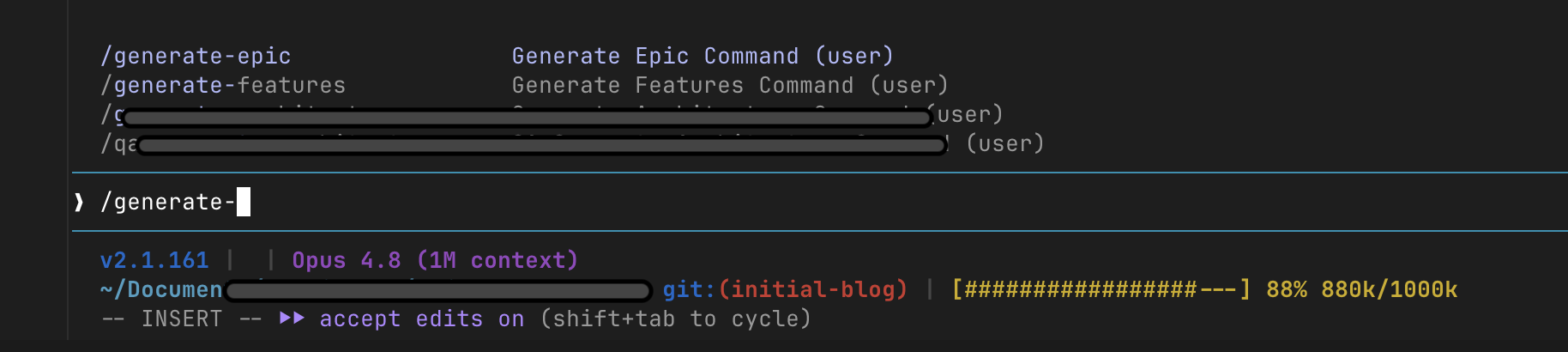
A few people have asked what these commands actually look like, so here are sanitized versions of the five this post walks through, enough to start from and adapt.
Peek at a few of these commands (sanitized samples)
Each one is just a markdown file: a short description at the top, then plain instructions. Drop it in your commands/ folder and invoke it by name, like /generate-epic. These five cover the whole loop in this post.
/generate-epic
---
description: Turn a plain-English request into a structured epic (goal, phases, acceptance criteria).
argument-hint: <what you want to build>
---
Read the request in $ARGUMENTS and any linked docs.
Write one epic under 01-product-owner/01-epics/ with: a one-line goal and the
business intent, the work split into ordered phases, and acceptance criteria
that define "done". Do not write code. Ask me if the goal is ambiguous.
/generate-features
---
description: Break an epic into small, buildable feature tickets.
argument-hint: <epic id>
---
For the epic in $ARGUMENTS, create features under 01-product-owner/02-features/,
each with a clear scope, the tasks to get there, a short validation check per
task ("how do we know this works"), and any dependencies. Keep each small enough
to build and review in one pass.
/eval-ticket
---
description: Evaluate a feature or defect ticket before it gets built. Read-only.
argument-hint: <feature or defect id>
---
Review the ticket in $ARGUMENTS. Do not write code. Flag anything that would block
a clean build: missing detail, unclear scope, hidden assumptions, or risky steps.
Return a short, actionable list, not a wall of text. A clean ticket is ready to
run; a messy one gets fixed first.
/run-feature
---
description: Build a single feature: work through its tasks, write the code and tests.
argument-hint: <feature id>
---
Implement the feature in $ARGUMENTS. Work through its tasks in order, write tests,
and run them. Mark each task done in the feature file as you go. Keep the changes
scoped to this one feature.
/create-defect
---
description: Write up a bug as its own ticket so it's tracked, not lost.
argument-hint: <short description of the bug>
---
Capture the bug in $ARGUMENTS as a defect under 01-product-owner/03-defects/:
what's broken, steps to reproduce, expected versus actual, and the likely area.
A defect is a ticket like any other, so it goes through /eval-ticket before a fix.
A filing system every project shares
Commands that produce epics and features are only useful if those files live somewhere predictable. So I standardized a folder that every repo I work in carries, identical each time:
01-product-owner/
├── 00-architecture/      the rules every feature follows (much more on this in Part 3)
├── 01-epics/             the big units of work
├── 02-features/          features broken out of each epic
├── 03-defects/           bugs, logged like features
└── 01-po-tracker.md      one board that lists all of it
This sounds boring. In practice it’s the opposite. Because the structure is the same everywhere, the model always knows where to read and where to write, and so do I. Starting a new project isn’t “set up conventions” anymore. The conventions arrive with the folder.
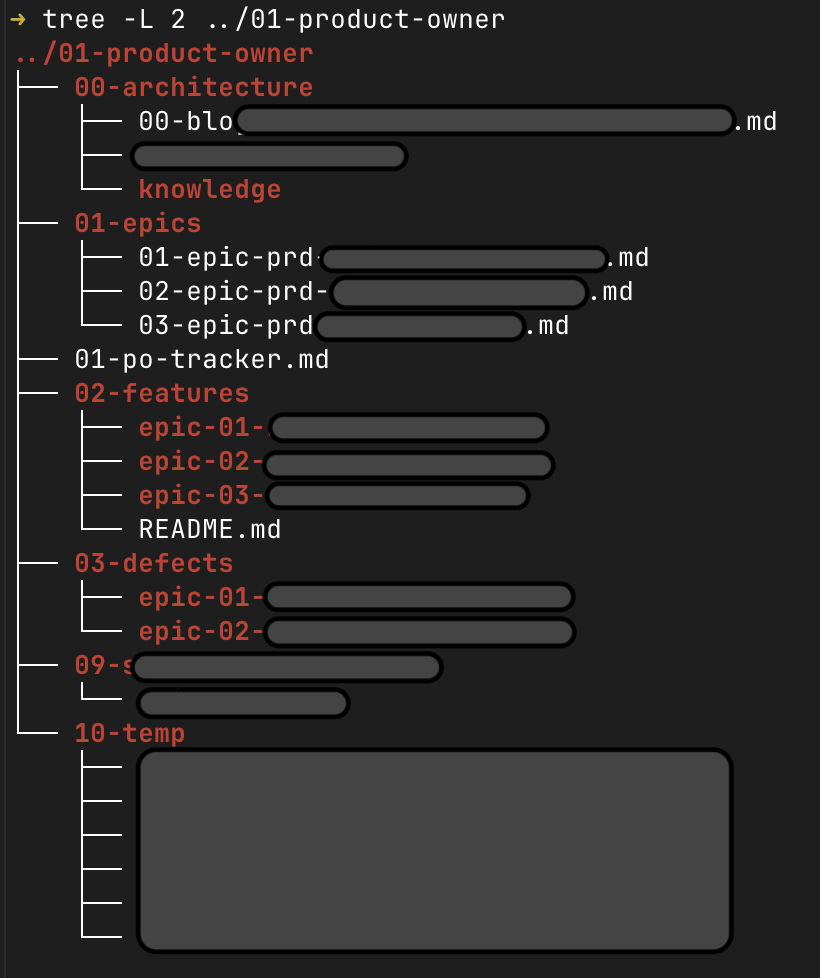
(The 09- and 10-temp folders are something I’m experimenting with, more on them in a later post.)
Phase zero: build it once, use it everywhere
Here’s the part that ties it together, and it’s a habit I’d recommend to anyone. I didn’t build
these commands inside one project. I keep them in their own versioned repo and point Claude Code’s
global config at it with a single symlink, the same way people manage dotfiles. ~/.claude, the
folder Claude Code reads on every run, is just a link to that repo. So every project I open
inherits the same commands automatically, with nothing to wire up per repo.
.claude/
├── commands/      generate-epic, eval-ticket ...
├── agents/        planner, implementer ...
└── instructions/ logging, formatting ...~/.claude → the repo's .claude/If you haven’t used a symlink before, it’s just a pointer from one path to another. The whole setup is one line: keep your config in a versioned repo, then point the folder Claude reads at that repo.
# keep your Claude config in a versioned repo, then link ~/.claude to it
ln -s ~/code/my-claude-toolkit ~/.claude
From then on, every project on the machine reads your toolkit through ~/.claude, and editing the repo updates all of them at once.
When I improve a command, every project gets the improvement at once, because they all read the same place. When I start something new, it inherits the whole process for free. Now and then a single repo needs its own one-off, and it can have one, but the default is global. Fix it in one spot, everyone benefits.
This also keeps me honest about portability. The commands are plain instructions, not anything locked to one machine or, in principle, even one model. That matters later in the series when I start comparing different ways to run them.
What this bought me
None of this is clever on its own. There’s no autonomy here yet, no agents reviewing each other, no contract keeping parallel work in line. That all comes later. What Phase 1 bought me was simpler and more important: I stopped starting from scratch.
Work became a repeatable process. Every step got more organized, whether I was building a new feature or fixing a bad design. It stopped being a guessing game, no more back and forth until the model finally understood me, or until I finally found the words for what was in my head. It was structured now, predictable and traceable, and I could run it over and over and follow every step forward and backward. It started to feel like a small team. The cognitive load didn’t vanish, but it chipped away, and I felt more in control and a little more productive.
One post in, here is the whole foundation in one place, the pieces the rest of the series builds on:
| Command or tool | What it does |
|---|---|
/generate-epic | turns a plain-English request into a structured epic |
/generate-features | breaks an epic into small, buildable feature tickets |
/eval-ticket | vets a ticket before it gets built, while fixes are cheap |
/run-feature | builds a feature, working through its tasks in order |
/create-defect | logs a bug as its own ticket, tracked like a feature |
01-product-owner/ | the shared filing system every repo carries |
01-po-tracker.md | the one board that lists every epic, feature, and defect |
~/.claude symlink | one global toolkit every project inherits |
Next in the series: what happens when a single session isn’t enough, the context window fills up, and I have to hand work from one session to the next without losing the thread. That’s where sessions, sub-agents, and a way to actually see all these files come in.