

Part 2 of Building My Agentic Workflow in Public. Part 1 turned my prompting into a repeatable process. This one is about the wall I hit right after: a single session is never big enough for real work.
In Part 1 I turned the way I work into a repeatable workflow: an agile-style vocabulary of epics, features, tasks, and defects, with a command to drive each step. It made the work predictable. It didn’t solve the bigger problem, which showed up the moment the work got real. An LLM session has a memory limit, and serious work blows right past it.
The wall
Every model has a context window, the amount it can hold in its head at once. Mine was around two hundred thousand tokens. Sounds like a lot, until you’re a few hours into building something. The conversation fills up, and as it does, the model starts compressing what came before to make room. That compression is where the pain lives. The summary keeps the gist and quietly drops the detail, and the detail is usually the part I cared about. Decisions get fuzzy. The model forgets why we did something a certain way. Quality slides right when I need it most.
So I started watching the gauge. When a session hit roughly eighty percent full, I stopped adding to it and did something deliberate instead of letting it degrade.
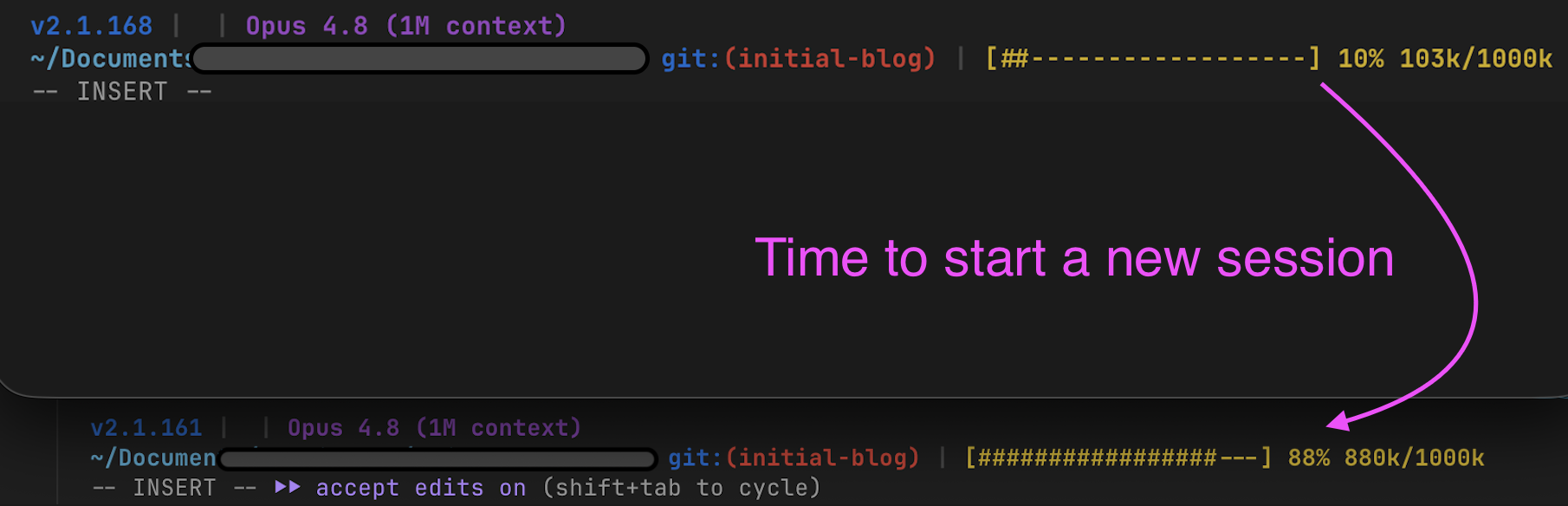
That gauge isn’t built in, so I made one. Claude Code lets you set a status line, a small script that prints whatever you want under your prompt. Mine shows a context bar: how full the window is, as a percentage and a token count, so I can see the wall coming instead of getting surprised by it. Here’s a trimmed version you can drop in and adapt.
A context-usage status line for Claude Code
Save the script below as ~/.claude/statusline.sh and make it executable: chmod +x ~/.claude/statusline.sh.
#!/bin/bash
# Claude Code pipes session JSON to stdin; pull the context window out of it.
input=$(cat)
ctx=$(echo "$input" | jq '.context_window')
used=$(echo "$ctx" | jq '.current_usage.input_tokens + .current_usage.cache_creation_input_tokens + .current_usage.cache_read_input_tokens')
size=$(echo "$ctx" | jq '.context_window_size')
pct=$(( used * 100 / size ))
filled=$(( pct / 5 )); empty=$(( 20 - filled ))
bar=$(printf '%*s' "$filled" | tr ' ' '#')$(printf '%*s' "$empty" | tr ' ' '-')
printf '[%s] %d%%  %dk/%dk\n' "$bar" "$pct" $((used / 1000)) $((size / 1000))
Then point Claude Code at it by adding this to ~/.claude/settings.json:
{
  "statusLine": {
    "type": "command",
    "command": "$HOME/.claude/statusline.sh"
  }
}
Now, under your prompt, you will see a bar like [########------------] 42% 84k/200k that fills as the window does. On another tool like Codex, the idea ports: search "<your tool> custom status line token usage", or ask your assistant to write you one and adapt it.
Handing off between sessions
The fix is a clean handoff between two commands, the way one shift hands off to the next.
/session-wrap ends a session on purpose. It looks at what changed, then writes a structured “Handoff State” block into a session.md file at the root of the repo: what got finished, what’s still in progress, what I’m blocked on, the next concrete action, any open questions, and which files are mid-edit. It also updates the status in my PO tracker, the running list of every epic, feature, and defect. The point is that everything the next session needs lives in those two files, in a predictable shape, instead of in my head. And it does all of that in a sub-agent, not in the session I’m in, so wrapping up barely touches the window I’m trying to protect.
Inside /session-wrap (sanitized, plus the file it writes)
The command itself, trimmed and generic. The first instruction is the important one: do the work in a sub-agent, so wrapping up does not cost your live window.
---
description: Wrap up a session: document what changed, hand off cleanly to the next one.
---
Do NOT do this in the main session. Spawn a sub-agent and hand it everything. The sub-agent:
1. looks at what changed (git status / diff)
2. asks which feature or defect was worked on
3. writes a "Handoff State" block to session.md (the fields shown below)
4. updates the status of those items in the PO tracker
5. prepares a commit message (does not push)
And the Handoff State block it writes into session.md, which the next session reads first:
## Handoff State
Updated: 2026-06-08 14:20
Last completed:   F2.3 token-usage parser, tests passing
In progress:      F2.4 dashboard chart, ~70% done
Blocked on:       nothing
Next action:      finish the F2.4 chart, then run its validation checks
Open questions:   should the chart show cost, or just token counts?
WIP files:        src/dashboard/Chart.jsx, src/dashboard/Chart.test.jsx
/session-start is the other half. It opens the next session by reading that Handoff State block first, then the tracker, then the project notes, and briefs me in plain language: here’s where you stopped, here’s the next thing to do. No archaeology, no re-reading a day of work. I’m back to productive in under a minute. It runs in its own sub-agent too, so the briefing doesn’t eat into the fresh session either.
Inside /session-start (sanitized)
A read-only briefing that runs in its own sub-agent, so it does not eat into your fresh window.
---
description: Start a session: read the handoff, brief me on where to pick up. Read-only.
---
Run this in a sub-agent with its own context window. The sub-agent reads, in order:
1. session.md     -> the Handoff State block from the last session (read first)
2. the PO tracker -> full epic / feature / defect status
3. project notes  -> conventions and current state
Then it hands the main session a short briefing: where you left off and the next
concrete step. It never writes code.
Both commands run their work in a sub-agent. That’s not a side detail. It’s the whole idea of the next section, applied to the two commands that bookend a session.
flowchart TB
  FULL["Session hits ~80% of the window"]
  FULL -->|"do nothing"| COMPACT["auto-compaction kicks in<br/>detail quietly lost, quality drops"]
  FULL -->|"/session-wrap"| HAND["session.md Handoff State<br/>+ PO tracker updated"]
  HAND -->|"/session-start"| FRESH["fresh session picks up<br/>exactly where you left off"]
Pushing work onto sub-agents
Handoffs help across sessions. Sub-agents help inside one. The trick: a sub-agent gets its own
separate context window. So when I run /run-feature or /run-defect, the heavy lifting happens
in a sub-agent that reads what it needs, does the work, and hands back a short summary. My main
session never has to hold all of that. It stays light and keeps the thread, while the messy detail
lives and dies in the sub-agent.
Here’s why that matters, in numbers. Say my window is 200k tokens. A few hours in, I’ve used 100k of it, half gone. If I hand a feature to a sub-agent, the expensive part, reading files, writing code, running tests, happens in the sub-agent’s own fresh window, not mine. My main session might spend 10k sending the request and reading back a summary, instead of the 100k it would cost to do all that work inline. I stay light. The sub-agent does the heavy lifting and then disappears.
flowchart TB
  MAIN["my session · 200k window<br/>~100k already used"]
  MAIN -->|"/run-feature delegates"| SUB["sub-agent · its own fresh window<br/>reads, builds, runs tests, validates"]
  SUB -->|"returns a short summary, ~10k"| MAIN
A bigger window helps, and I’ll give it real credit. Some tiers and models go up to a million tokens (Claude Code already knows about a 1M-context model; check your plan for what you can use), and moving to that made a real difference on long, code-heavy sessions: more room before I hit a wall, fewer handoffs, more of the project held at once. But even there I still reach for sub-agents, and I think I always will. A 1M window fills up too, just later. It costs more and runs slower per turn, because the model re-reads that whole context on every call. And quality tends to dip as the window fills, so even when I have the room, I’d rather not stuff it. Sub-agents keep my main thread lean, and they can run in parallel, each in its own window. The bigger window raised the ceiling. It didn’t retire the technique.
There’s one more piece that makes this safe. Every feature carries its own tasks, and every task carries a small check, a way to tell whether it was actually done right. So when a sub-agent works a feature, it isn’t guessing at “done.” It has something concrete to validate against. That matters a lot once you’re not reading every line the sub-agent writes, which is the whole point of handing work to it.
And this isn’t something I hope the model remembers to do. It’s written into the command. /run-feature spawns a sub-agent for each phase of the work and hands it the feature with one standing instruction: validate what you build against the checks written into each task. That’s where the structure from Part 1 pays off, because a feature isn’t just a description. It’s a set of tasks, and each task carries its own validation a sub-agent can actually test against.
What a feature looks like (tasks + validation)
A feature is broken into tasks, and each task carries a validation: a concrete check the sub-agent can verify instead of guessing at "done." Copy the shape, adapt the content.
## Feature F2.4: token-usage chart
### Task F2.4.1: read the per-day token totals
Validation: given a sample file, returns one row per day with a numeric
total; an empty file returns an empty list, not an error.
### Task F2.4.2: render the chart
Validation: one bar per day; hover shows the token count; no console errors.
### Task F2.4.3: handle the no-data case
Validation: with zero rows, show "no usage yet", not a broken chart.
Finally seeing the work
By now my projects had a lot of markdown. Epics, features, defects, a tracker, all in that shared
01-product-owner folder from Part 1. It was structured, but it was still a pile of files, and I’m
not great at holding a pile of files in my head. I kept opening them one at a time to remember where
things stood.
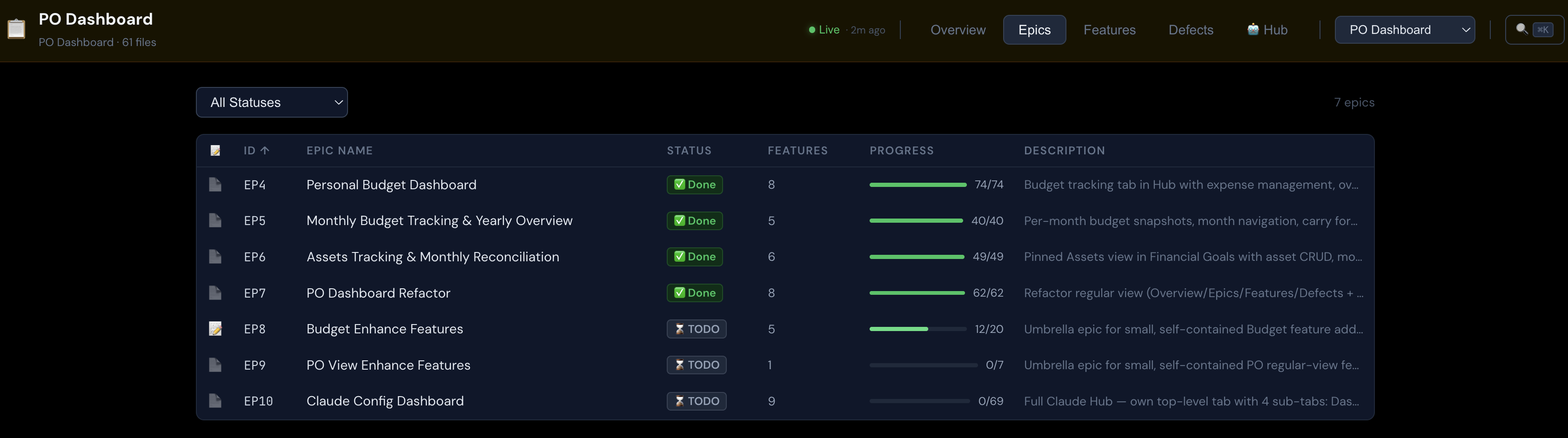
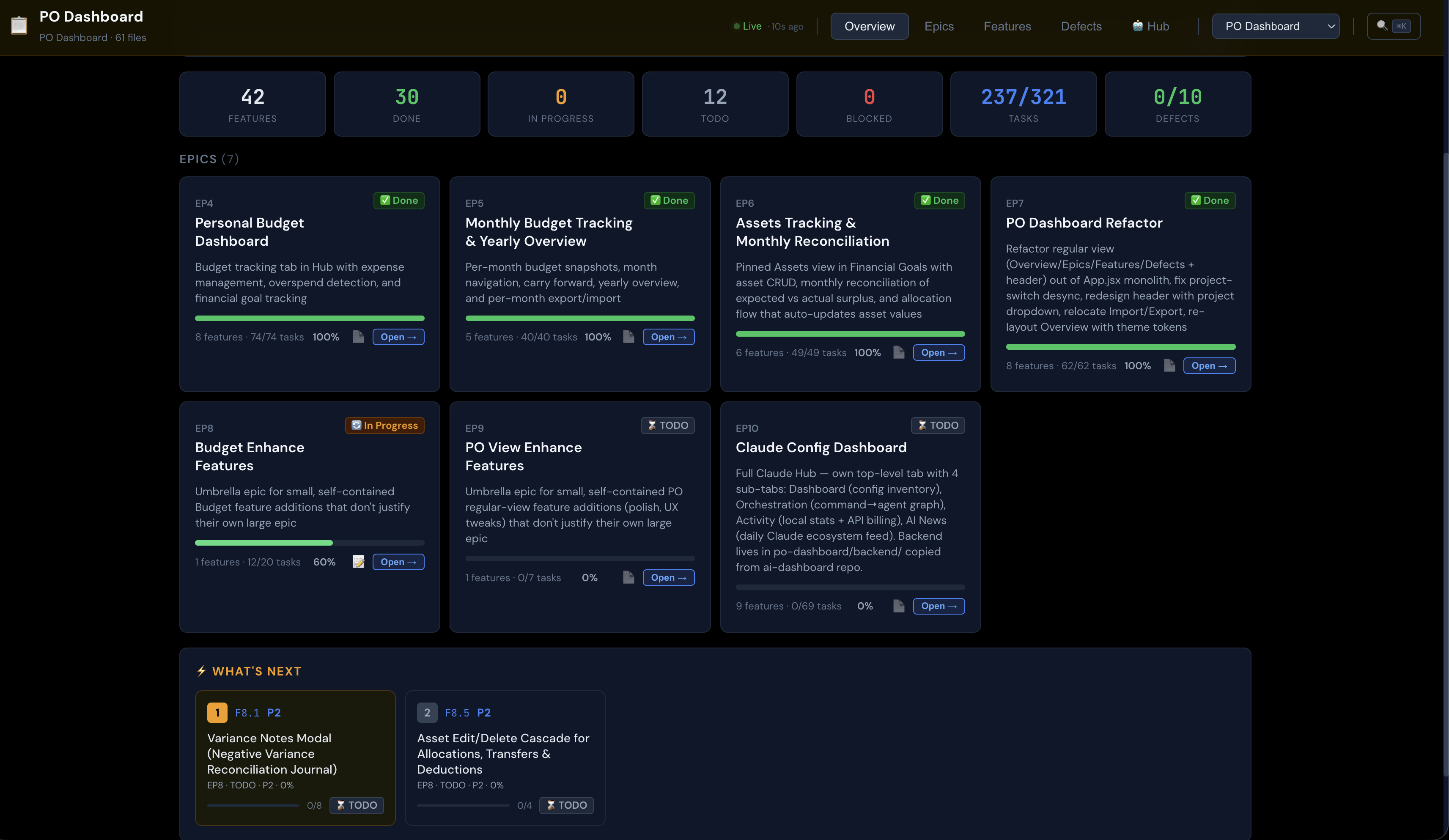
So I built a tool for myself, the PO Dashboard, that reads those exact files and shows them. It’s a
plain local app, nothing deployed, that points at the 01-product-owner folder and turns it into
something I can actually look at. Epics with progress bars. Features by status and priority. Open
defects. A “what’s next” panel that tells me the most important thing to pick up. I can click into
any item and read it, or jot a note.
flowchart TB
  C["/generate-epic and /generate-features<br/>write markdown"]
  C --> MD["01-product-owner/<br/>epics · features · defects · tracker"]
  MD --> D["PO Dashboard<br/>reads and visualizes the same files"]
The PO Dashboard doesn’t own any data. The markdown is still the single source of truth, the same files the commands write and the sub-agents read. It’s just a friendlier window onto them.
That window needed one more command to stay reliable, and the reason is subtle. Different Claude sessions, on different days, format the same markdown a little differently. One session writes ## Epic 2: Resume Generator, another writes ## EPIC-02: resume generator; one lays a task out one way, the next does it slightly differently. To me it all reads fine. But the PO Dashboard parses these files with a strict parser, and a small format drift is enough to make it show an empty epic or “0 features” even though all the content is right there. So I added /fix-po-format. It reformats the files to the exact shape the parser expects, without changing a single word of content, so the dashboard keeps displaying everything correctly.
What this phase bought me
Part 1 gave me a process. Part 2 made it survive contact with real, multi-hour, multi-session work. Sessions hand off cleanly instead of rotting at the eighty percent mark. Sub-agents absorb the expensive context so my main thread lasts. And the PO Dashboard means I can see the whole project at a glance instead of spelunking through markdown.
Two posts in, here’s the whole kit. Not a pile of commands, but a small repeatable system:
| Command or tool | What it does | Added in |
|---|---|---|
/generate-epic | turns a plain-English request into a structured epic | Part 1 |
/generate-features | breaks an epic into small, buildable feature tickets | Part 1 |
/eval-ticket | vets a ticket before it gets built | Part 1 |
/run-feature | builds a feature, in a sub-agent | Part 1 |
/create-defect | logs a bug as its own ticket | Part 1 |
01-product-owner/ | the shared filing system every repo uses | Part 1 |
~/.claude symlink | one global toolkit every project inherits | Part 1 |
/session-wrap | writes a Handoff State to session.md, updates the tracker | Part 2 |
/session-start | reads the handoff, briefs me on where to resume | Part 2 |
| sub-agents | do the heavy work in their own context window | Part 2 |
| PO Dashboard | turns the planning files into something I can scan | Part 2 |
/fix-po-format | normalizes the markdown so the dashboard parses it | Part 2 |
| status line | shows the context window filling up | Part 2 |
Plan, build, hand off, watch. That’s the flow so far, and the point is that my own attention is no longer the first thing to break.
The pain this actually saved me from is specific. I’d be deep in a piece of work, real momentum going, and hit the 200k wall mid-task. The session would auto-compact to make room, and a chunk of what we’d figured out together would just thin out. The model would forget a decision from an hour earlier, right when I needed it. Wrapping on my own terms, before that happens, is the difference between handing off a clean state and watching the session quietly get dumber under me.
None of this makes the model smarter. It makes the system around it hold up under load, which is a different thing, and the thing that actually lets you build something nontrivial.
There was still a problem waiting, though, and it was a nasty one. Once I had sub-agents building different features in parallel, they started to disagree with each other. Each one built its piece reasonably, but they didn’t match. That divergence is what Part 3 is about, and it’s where this whole workflow had to grow up.